For your Sipmon to be able to send notification emails, you need to configure a local smtp server. If your operating system is RHEL, CentOS or Oracle Linux, Postfix is already installed.
This page gives you an example of a possible configuration. Refer to the official Postfix documentation for more information.
Notifications commands are executed by the poller that monitors the resource: you need to configure the mail relay on all pollers.
We recommend that you use a dedicated email account to send notifications.
Step 1: Configuring Postfix
In your server's terminal, enter the following command:
yum -y install mailx cyrus-sasl-plainRestart Postfix:
systemctl restart postfixConfigure Postfix to run at startup:
systemctl enable postfixEdit the following file:
vi /etc/postfix/main.cfAdd the following information:
myhostname = hostname relayhost = [smtp.isp.com]:port smtp_use_tls = yes smtp_sasl_auth_enable = yes smtp_sasl_password_maps = hash:/etc/postfix/sasl_passwd smtp_tls_CAfile = /etc/ssl/certs/ca-bundle.crt smtp_sasl_security_options = noanonymous smtp_sasl_tls_security_options = noanonymous- myhostname is the hostname of the Sipmon server.
- relayhost is the email server for the account that will send notifications.
In the following example, Sipmon will use a Gmail account to send notifications:
myhostname = Sipmon-central
relayhost = [smtp.gmail.com]:587
smtp_use_tls = yes
smtp_sasl_auth_enable = yes
smtp_sasl_password_maps = hash:/etc/postfix/sasl_passwd
smtp_tls_CAfile = /etc/ssl/certs/ca-bundle.crt
smtp_sasl_security_options = noanonymous
smtp_sasl_tls_security_options = noanonymous
Step 2: Configuring the credentials of the account that will send emails
Create a
/etc/postfix/sasl_passwdfile:touch /etc/postfix/sasl_passwdAdd the following line (replace
username:passwordby the credentials of the account that will send the notification emails):[smtp.isp.com]:port username:passwordExample:
[smtp.gmail.com]:587 username@gmail.com:XXXXXXXXSave the file.
In the terminal, enter the following command:
postmap /etc/postfix/sasl_passwdFor security reasons, change the permissions on the file:
chown root:postfix /etc/postfix/sasl_passwd*
chmod 640 /etc/postfix/sasl_passwd*
Reload Postfix so that chenges are taken into account:
systemctl reload postfix
Testing and troubleshooting email configuration
To send a test email, enter the following command:
echo "Test" | mail -s "Test" user@isp.comReplace
user@isp.comby a real email address: the recipient should receive the test email.If the user hasn't received the message, check the following log file:
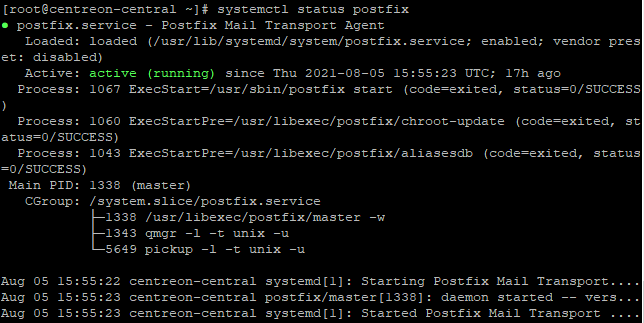
tail -f /var/log/maillogTo check that your Postfix service is running, enter:
systemctl status postfixThe results should look like this:
Gmail configuration
If you want to send emails through a Gmail account, you will need to turn on the Allow less secure apps option on this account. See Less secure apps & your Google Account.